Boulderflash
The search for the optimal scrolling tilebased game engine in flash

All of these examples require Flash 8 to run
Feedback is welcome !

Goal
To design a smooth tile based game engine with smooth scrolling, and possibly huge levelmaps in flash.
(Apparently not very straighforward to do)
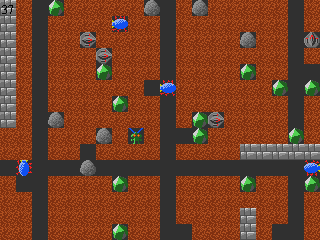
As an example I'll use the well known game boulderdash (or emerald mines).
All graphics are from the game emerald mines.

Example 1

Open the demo:
http://www.steffest.com/boulderflash/ex1.html

After reading up I decided not to bother with backwards compatibility: Flash 8 clearly is the way to go because it provides some bitmapdata functionality like copyrect etc. that are heaps faster than moving around MovieClips.

The bottleneck of most tilebased games is the graphic engine, and most of all the scrolling of the screen.
So, my first efforts are to make a kick-*ss scrolling tiles engine.
Demo1:
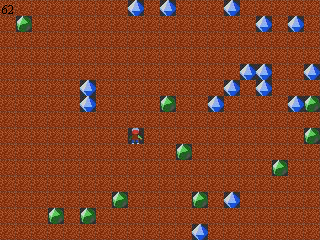
The map uses tiles of 16x16 pixels and is random generated.
Every frame, the bitmap of the visible tiles are copies onto flash.display.BitmapData.
Scrolling is achieved by setting the offset of the visible tile rectangle.
The map is 128x128 tiles big, but the best part is that the mapsize doesn't really affect the cpu-load: only a 320x240 is copied to the screen, no matter what's the size of the surrounding map.
Here's an example using a 512x512 grid: It's slow to initialize because the map has to be generated, but the engine itself runs fine.

this demo runs with a 8% cpu-load on my machine, which is perfect.
Most engines I've seen perfom far worse :-)
The filesize is 8KB


Example 2

Open the demo:
http://www.steffest.com/boulderflash/ex2.html

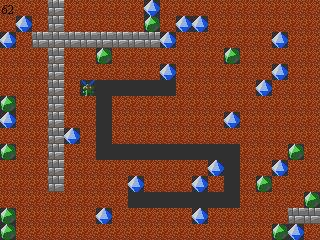
I've added some basic player movements.
There's no gravity yet, so the player can move anywhere, except through a wall.
Scrolling only occurs when the player moves to the edge of the screen.

The first thing you'll (maybe) notice is that the scrolling and the movements are aligned with the grid: In this kind of games, when an object moves, it moves always in whole tiles. the player can not just move a few pixels and then stop.
So the movements are chopped into smaller steps:
1: Check for input and move player if necessary.
2: move player if necessary.
3: move player if necessary.
.....
In the final step: move player if necessary and update the grid with the new positions.
This way, you have smooth movements that still are aligned with the grid.

After some experimenting, I found that keeping track of all the movement-offsets is a bottleneck of its own, so i used an old trick often used in these kind of games: Don't move anything at all !

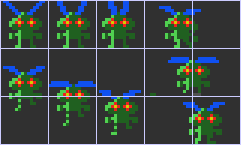
The trick is to provide a bitmap for each step of the movement, including the movement offset.
An example will make this more clear. These are the images of the main player. (I added the gridlines for clarity and enlarged it 300%)

This way, you only have to copy another image on the same place, and the player appears to move.
This adds a bit complexity to the sprite-bitmap, but it makes the code very clear and fast.

So in short: there are NO movieclips in this flash movie, and certainly no moving movieclips, because they are simply too slow to process. Flash 8 makes manipulating bitmaps a breeze, and most of all: it's way faster than the Movieclip approach.
Still ... you have to be carefull with the screensize: Here's the same engine running in 640x480 .... quite slow ...
If anyone has got some ideas how to optimize this any further: I'll be posting the source codes soon.

Next step is to add logic to the game-engine and getting more objects to move.
This will be a challenge of its own because flash actionscript is very slow and looping through the entire grid each frame simply will not do it ...


Example 3

Open the demo:
http://www.steffest.com/boulderflash/ex3.html

November 2007:
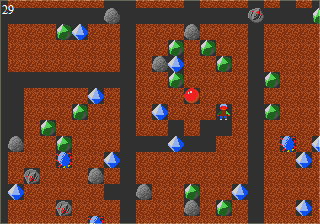
Some game logic has been added.
Most important: gravity: boulders, diamonds and emeralds fall down when not supported.
You can collect emeralds and diamonds (and dirt) but nothing else.
Some enemies are already there: bugs and tanks: they are dumb creatures that crawl the cave.
Don't worry about touching them ... for now: you can't die yet !

With some loop optimisation, Actionscript is capable of checking a standard 64x32 cave in 1 frame, so thats not bad.
Even a cave full of crawling bugs (that's 1800 moveing objects with a calculated behaviour) is no problem.

But ... the script delay is noticable allready ...the scrolling is not as smooth as the first example without game logic.
I think when I add all the missing Emerald Mine objects (like Yams, robots, magic walls, nuts, keys, doors, acid, amoeba) then the engine will be saturated.
This engine uses a 2 dimensional array to hold the leveldata. 1 dimensional arrays are usually much faster, so as comparison I changed the engine to use a 1 dimensional array.
Hmmm ... a tiny bit faster but hardly noticable. Plus, the code isn't that clear and readable anymore.
Speed optimization is a good thing, but not if it turns your code into un-reusable and incomprehensible garbage.
So: back to the 2 dimensional arrays.

Offcourse, nowadays we have Flash9 - with the much (MUCH!) faster Actionscript3, but that will be for another incarnation: Last week I got hold of Flash Lite 3 for mobile devices, which supports flash8/Actonscript 2 content. Yeah!!! Emerald Mines on my mobile phone!

This time, I'll stick to Flash 8, and settle for EMV4 compatibility.
Still: that is good enough - there are "only" about 30.000 emerald mines leves out there :-)

That brings me to the next step: Now is also the time to add a level-loading routine to the game, instead of rendering it randomly.
Emerald mines uses a binary levelformat, but with the current state of webstandards- it seems obvious to store the leveldata in XML.
Unfortunatly, there is no current boulderdash or emerald mine XML levelformat, but the "BoulderDash Common File Format" comes pretty close, so I'll adopt that one.

Next step is to add the missing game logic, most notably that you can actually get killed in those dangerous caves and that you can get to the exit after collecting enough diamonds, actually finnishing a game.

Then the missing Emerald mine objects, levelset loading, sound, scoring and timing ....

To observe the behaviour of the engine, some more examples:
- Stretching the movie takes away some resources, so a lower framerate, but more nostalgica!
- the engine running with visibla area of 640x480
- a cave with 1800 bugs to be calculated each frame.
- a big level with 16384 tiles (128x128): You clearly see the actionscripting sucking all the juice each frame: unplayable!
- the same 128x128 levelmap with the 1 dimensional array engine ... not faster

Sourcecode is available:
BoulderflashV3_CS3.zip
Flash CS3 is needed to open it, but if you don't have it: No worries! read on ...

And since this is turning into an Open Source project anyway, I have moved it to the excellent Open Source Flash compiler Mtasc .
This brilliant compiler lets you compile Actionscript 2 into swf files, so you don't need the Flash IDE anymore.

Currently I still use Flash CS3 to compile the bitmap into an swf, but I'll move that to the equally brilliant swfmill shortly, that lets your compile binary assets into swf from an XML file.
Add to that my favourite Actionscript editor, Flashdevelop (with build in Mtasc support) and you have the perfect free open source flash developers package.

Sourcecode to compile with Mtasc (no .fla needed here)
Boulderflashv3.zip

or if you're having trouble to get it to compile:
This is a version that includes Mtasc. Just hit compile.bat and you're done.
Boulderflashv3_mtask.zip


Example 4


Open the demo:
http://www.steffest.com/boulderflash/ex4
.html

December 2007:
A major rewrite: instead of looping through the entire possible object collection for each tile each frame, I decided to make a better use of the object oriented nature of flash and moved all the game element logic to a function of the "object" holding all the properties and methods of the game element.
The big advantage is that there's no limit to the amount of different game elements it can support (other then memory).
The drawback is that there are big "objects" passed around in function calls instead of simple numbers, but apparently that's something flash can handle well: there is no slowdown using this approach.

Some more Emerald Mine logic has been added: the player is now actually the main character from Emerald Mines and this main character is handled a little different then all other objects: the player logic is handled before the rest of the grid scan.
This is important to obtain smooth player interaction with other objects.
For example: when you stand under a rock and start to move down,left or right, the rock will fall immediatly. With all other moving objects, the rock will wait until there's an empy space below, and then start to fall.
A minor difference maybe, but a big issue in Emerald Mines!

A level loading routine has been added, based on the BDCFF.
I extended this format a bit to handle more objects.
This proposal can be found here.

And to get some levels for boulderflash, I dug out my old DX Boulderdash leveleditor and extended it a bit so it could read/write these new type of levelfiles.

Download BoulderEditor V0.26


Example 5


Open the demo:
http://www.steffest.com/boulderflash/ex4
.html

January 2008:
Apparently I switched the X and the Y axis when moving from a 1dim to a 2dim array.
That took some annoying few hours to fix ...
but now the x-axis is horizontal and the Y-axis is vertical.